
Why Your System Crashes Under Load — and How Kafka and SQS Push Back
Part 3 of "Building Software That Doesn't Fall Over"

Intro
Welcome back. In Part 2 we looked at what happens when multiple workers fight over the same data — race conditions, stale reads, and why a single Redis thread is actually a feature. Today we move one layer up the stack.
The failure mode this time isn’t a data conflict. It’s volume. Specifically: what happens when data arrives faster than you can process it, and nothing in your system knows how to push back.
That’s backpressure — or rather, the lack of it.
Backpressure in plain terms
Every data pipeline has two roles: a producer generating work, and a consumer processing it. When the producer is faster than the consumer, the difference has to go somewhere — usually a buffer or queue.
Backpressure is the mechanism that lets the consumer tell the producer “slow down, I’m full.” Without it, the buffer just grows until something crashes.
Three problems, three different solutions
In real world backpressure can shows up in different shapes. For this article, I will go through 3 examples with 3 different solutions, hopefully you guys can find actual use case in some of them.
Problem 1: Streaming large data through a single process
Scenario: Let’s imagine a user requests a CSV export of their entire transaction history — 2 million rows. Your service streams rows from Postgres straight into the HTTP response. In testing with 100 rows, fine. In production, Postgres sends rows faster than the HTTP socket can flush them to the client. Node.js buffers the difference in memory. Within 30 seconds, that single request has consumed 800MB of heap. A few concurrent exports later, the process is killed by the OS.
This is a single-process problem. Here, all the data is flowing through one Node.js process. The only way out is to slow down the source until the destination catches up.
The solution: Node.js streams with highWaterMark and .pipe().
Every readable and writable stream in Node has a property called highWaterMark — the maximum amount the internal buffer holds before signalling it’s full. Default is 16KB for byte streams, 16 objects for object-mode streams.
Here’s how the signal works.
// The easy way — .pipe() handles backpressure for you
postgresStream.pipe(httpResponse)

// What .pipe() actually does under the hood:
postgresStream.on('data', (chunk) => {
  // write() returns false when buffer exceeds highWaterMark
  const canContinue = httpResponse.write(chunk)

  if (!canContinue) {
    // Buffer is full — stop reading from Postgres
    postgresStream.pause()
  }
})

// When the buffer drains below highWaterMark, resume reading
httpResponse.on('drain', () => {
  postgresStream.resume()
})
Rule of thumb: always use .pipe() instead of writable.write(chunk) and let it handle the loop for you.
Problem 2: High-throughput event pipeline between services
Scenario: Your app emits thousands of events per second — user clicks, payment attempts, feature usage. A downstream analytics service consumes these to update dashboards and write audit trails. During peak hours, events arrive 10x faster than the consumer can process. If nothing slows the producers down, events pile up and crash the consumer, or get dropped on the floor.
The solution: Kafka has a very elegant way to resolve this.
Quick intro: Apache Kafka (or Kafka for short) is a Java based software that is optimized for ingesting and processing high volume of data streaming.
The key idea: Kafka stores events in an ordered log called a topic. Producers append to the end. Consumers read from wherever they left off, at their own pace. The producer never waits for the consumer — the log absorbs the difference.
Each consumer tracks its position with an offset — a number pointing to the last event it processed. The gap between the latest event and the consumer’s offset is called consumer lag — the early warning signal that the consumer is falling behind.
// Fetch a batch of events to process
const analyticsConsumer = kafka.consumer({ groupId: 'analytics' });

await analyticsConsumer.run({
  // max.poll.records: how many events per fetch (default 500)
  // Lower this if processing is slow
  eachBatch: async ({ batch, pause, resume }) => {

    if (downstreamIsOverwhelmed()) {
      // Tell Kafka to stop sending us events
      // Events stay safe in the log — nothing is lost
      pause([{ topic: 'user-events' }])

      // Resume after a cooldown
      setTimeout(() => resume([{ topic: 'user-events' }]), 30_000)
      return
    }

    await processBatch(batch)
    // Commit our new offset — we've processed up to here
  },
})

const auditConsumer = kafka.consumer({ groupId: 'audit' });
// ....
Key gotcha: if your processing exceeds max.poll.interval.ms (default 5 minutes), Kafka assumes your consumer is dead and reassigns its work to another consumer. Same events get re-processed when you rejoin. For slow consumers, drop max.poll.records to 10–50.
Problem 3: Massive parallel async tasks
Scenario. You run a serverless image processing pipeline. Users upload images via API, the API drops a message into an SQS queue, and Lambda functions process each image — resize, watermark, store. Normal traffic is 50 messages/min. A marketing campaign goes live — suddenly it's 50,000 messages/min. Lambda scales fast and spawns 800 concurrent executions. Each one opens a Postgres connection. Your database has a 100-connection pool. 700 connections get refused, Lambda retries, SQS re-delivers, and you now have a thundering herd pointed straight at your database.
Why doesn't Kafka solve this? Kafka is great for streaming events, but each message here is a task — one image to process, then delete. You don't need replay, you don't need multiple consumers reading the same data. You need a queue where each task is picked up once, plus an autoscaling consumer that doesn't bury your database.
The solution: SQS visibility timeout + Lambda reserved concurrency.
const imageJobs = new Queue(this, 'ImageJobs', {
  visibilityTimeout: Duration.seconds(60),
})

const imageProcessor = new Function(this, 'ImageProcessor', {
  runtime: Runtime.NODEJS_20_X,
  handler: 'index.handler',
  code: Code.fromAsset('lambda'),
  timeout: Duration.seconds(30),

  // Cap parallel executions — the actual backpressure mechanism.
  // No matter how many messages pile up in SQS, only 50 Lambdas
  // run at once. Messages wait in the queue for a free slot.
  reservedConcurrentExecutions: 50,
})

imageProcessor.addEventSource(new SqsEventSource(imageJobs, {
  batchSize: 10,
  maxConcurrency: 50,
}))
Without reservedConcurrentExecutions, Lambda will spawn hundreds of parallel functions during a spike — each opening a database connection, each adding load. The cap is what turns Lambda from "fan out infinitely" into a controlled consumer.
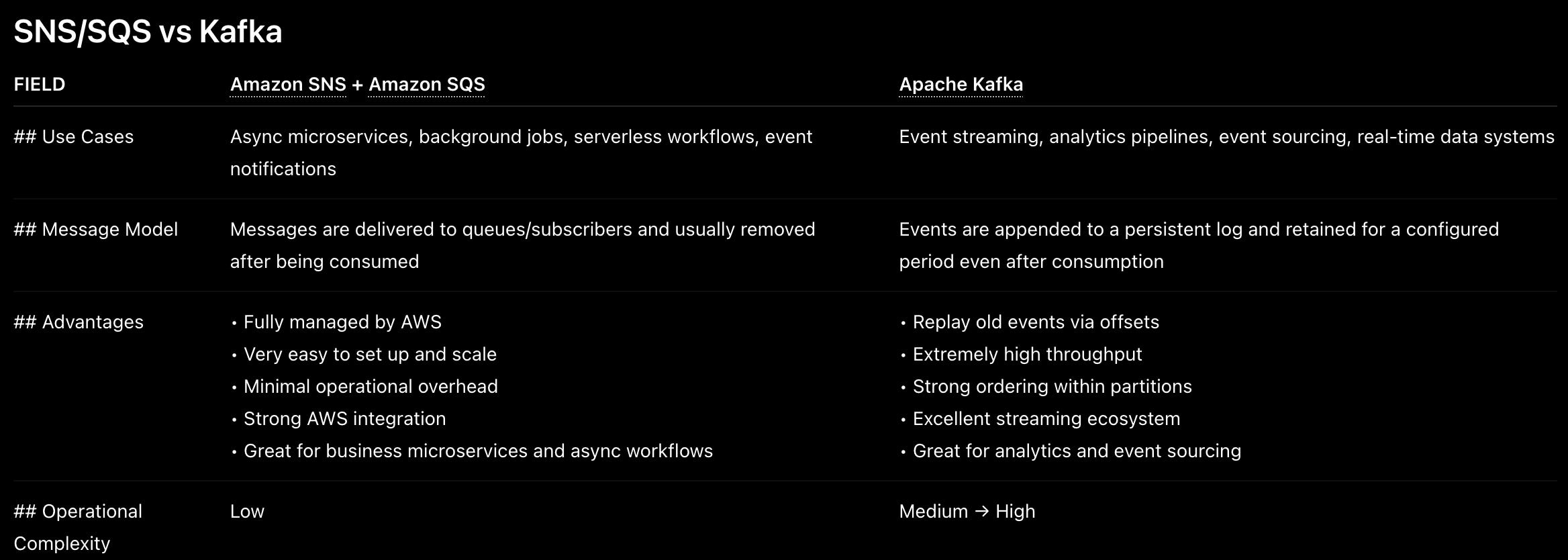
Overlaps between AWS SQS/SNS and Apache Kafka
From the simple example above, one may wonder we can switch between either SNS/SQS (Topic Fanout design) and Kafka. But in reality, there are huge different between the 2. Here are quick overview of both.
Conclusion
If you guys have reached this point, congrats, it has been a long article that go through briefly 2 very popular technologies in designing distributed system. I will let you guys go for now, and see you all in next part
Next up — Part 4: Stateless Scaling. How load balancers decide where your request goes, why sticky sessions are a trap, and what "stateless" actually requires from your application layer.